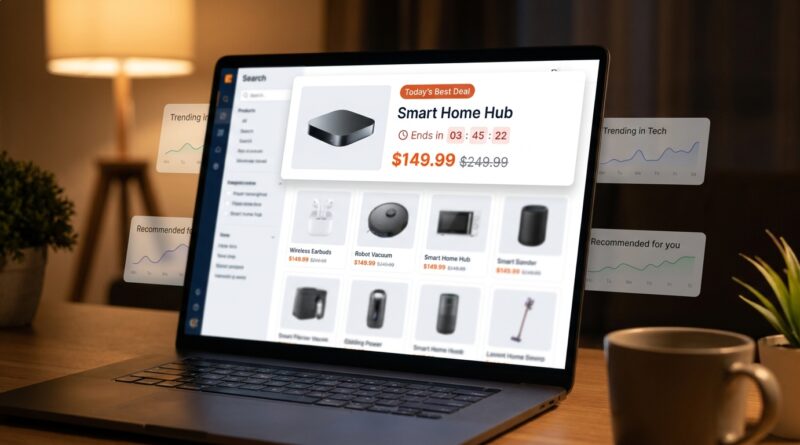
The ‘Search-Flash’ Strategy: Turn On‑Site Search Into Your Highest-Converting Flash Sale Slot
You set up a flash sale, send the emails, maybe even pay for extra traffic, and then watch shoppers do something maddening. They hit your search bar, type “black dress medium” or “running shoes blue,” and drift off into regular results that barely mention your deal. It feels like they are standing inside your store asking for help, and your site points them away from the promotion you worked so hard to build. That is the gap the ecommerce flash sale search bar strategy fixes. Instead of treating search as a plain utility, you turn it into a high-intent promo slot. When someone searches, they are telling you exactly what they want. That is not random browsing. That is buying intent. If you place a relevant flash sale card, badge, or top result inside that moment, you can lift conversions fast, using traffic you already paid to attract.
⚡ In a Hurry? Key Takeaways
- Turn your on-site search bar into a flash sale placement because searchers are often your warmest buyers.
- Pin a relevant deal at the top of search results, add sale badges, and redirect zero-result searches to close alternatives.
- This protects margins better than discounting the whole catalog and can often be shipped quickly with light dev work.
Why shoppers vanish after using search
Most store owners think of search as a tool for navigation. Shoppers think of it as a shortcut to a decision.
That difference matters.
When somebody uses your search bar during a flash sale, they are usually not in discovery mode. They are trying to answer a buying question fast. Do you have my size? Is there a red version? Is there a cheaper alternative? Is the deal product still in stock?
If your search experience only shows plain product listings, those shoppers can miss the promotion entirely. Worse, if the exact item is out of stock or badly tagged, they hit a dead end and leave.
This is why an ecommerce flash sale search bar strategy works so well. It meets intent at the exact moment the buyer is already raising their hand.
What the “Search-Flash” strategy actually is
Simple version. You reserve part of your on-site search experience for a rotating flash sale offer.
That can mean:
- A sponsored top result tied to the shopper’s query
- A deal banner above the search results
- Sale badges on matching products
- A fallback card when the searched item is unavailable
- A “today’s deal” module inside autocomplete
The goal is not to hijack search with irrelevant promos. That annoys people fast. The goal is to make the sale visible and useful inside the path buyers are already taking.
Think relevance first
If someone searches “kids winter boots,” do not show them a random kitchen clearance item just because it has the deepest discount.
Show a discounted kids boot first. Or a close match. Or a category-level sale message. Keep it tight. Keep it helpful.
Why this often converts better than another email blast
Email can drive traffic. Search catches intent.
That is the whole game.
A person who opens an email may be curious. A person who searches “size 9 black ankle boots” is trying to buy something specific. That is why search users often convert at a higher rate than average site visitors.
So instead of pushing harder at the top of the funnel, you can improve the moment closest to checkout.
This also helps you avoid one of the classic flash sale mistakes, which is building a good offer with a messy path to it. That is why it pairs nicely with The ‘Solo-Deal Landing’ Strategy: Turn One Product Page Into A Flash Sale Powerhouse. One tactic sharpens the destination. The other improves the route people take to get there.
How to set it up without making your site feel pushy
1. Pick search terms with buying intent
Start with your top on-site searches from the last 30 to 90 days.
Look for:
- Brand + product searches
- Color and size searches
- High-volume category searches
- Common misspellings
- Zero-result searches
You do not need to cover everything. Even the top 20 to 50 search terms can make a real difference during a flash sale.
2. Match each intent cluster to one deal
Group similar searches together. For example:
- “white sneakers,” “white trainers,” “women’s white shoes”
- “queen sheets,” “bed sheets queen,” “cotton queen set”
Then attach one flash sale product or collection to that cluster.
This keeps the promotion relevant. Relevance is what makes the strategy feel helpful instead of salesy.
3. Add a promo placement in the search experience
You have a few options here, depending on your platform and dev resources.
- Pin one flash sale item as the first result for matching searches
- Insert a promotional tile above organic search results
- Show a “Flash Deal” strip inside autocomplete dropdowns
- Add badges and urgency text to matching results
If your team can only do one thing this week, pin the most relevant sale item at the top for your highest-volume search terms.
4. Build a fallback for dead ends
This part is easy to overlook and very profitable.
If a shopper searches for a sold-out item, an old model, or a product you do not carry, do not show a blank page with “0 results.” Show:
- A close substitute
- A sale collection
- A back-in-stock signup
- A top-selling alternative in the same category
Blank search pages kill momentum. Good fallback suggestions save the visit.
5. Keep the promotion time-boxed
Flash sales work because they feel current.
Use clear labels such as “Today Only,” “Ends Tonight,” or “Weekend Deal.” Then make sure the slot changes when the promotion ends. Nothing erodes trust faster than stale urgency.
What this looks like in the real world
Imagine you run an apparel shop. Your flash sale is 25 percent off selected jackets.
A shopper types “black puffer medium.” Instead of seeing ten ordinary products with no context, they see:
- A top result for the discounted black puffer in medium
- A badge that says “Flash Sale 25% Off Today”
- Two close alternatives below if that size is low in stock
Now imagine that exact item is gone.
Instead of losing the sale, your search page says, “That item is almost gone. Here are three similar puffers in today’s flash sale.”
That is the strategy. You are not forcing a detour. You are rescuing intent.
Metrics to watch
You do not need a fancy analytics setup to prove this works. Track a few plain-English numbers:
- Search-to-purchase conversion rate
- Click-through rate on the promoted search slot
- Revenue per search session
- Exit rate from search results pages
- Zero-result rate and zero-result recovery rate
If searchers click the featured deal more often and buy more often, you are on the right track.
A good quick test
Run the Search-Flash setup on a small set of high-intent queries for one flash sale weekend. Compare those search sessions against similar terms from the previous period.
You are looking for lift, not perfection.
Common mistakes that weaken the strategy
Showing irrelevant deals
This is the big one. If your sale placement does not match the query, shoppers stop trusting the search tool.
Ignoring mobile
Many search sessions happen on phones. If your promo card pushes real results too far down the page, mobile users may bounce. Keep it compact.
Not syncing inventory
If your pinned flash sale item is out of stock, you create frustration instead of urgency. Inventory updates need to be fast.
Forgetting autocomplete
Some of the best real estate is before a shopper even hits enter. A small deal callout inside autocomplete can capture attention early.
Who should use this first
This is especially useful for stores that already get decent traffic but feel like every flash sale requires more ad spend, more email sends, or broader discounts.
If your shoppers use search often, this is low-hanging fruit.
It is also useful for stores with wide catalogs, lots of variants, or products where people search by attributes like size, color, compatibility, or model number.
At a Glance: Comparison
| Feature/Aspect | Details | Verdict |
|---|---|---|
| Traffic source | Uses shoppers already on your site and already searching for something specific. | High-value and efficient. |
| Margin impact | Promotes selected items or categories instead of cutting prices across the whole catalog. | Safer than sitewide discounting. |
| Implementation effort | Often possible with pinned results, badges, simple banners, and zero-result redirects. | A practical quick win for many teams. |
Conclusion
The smart move is not always another campaign. Sometimes it is fixing the moment right in front of you. Right now, most Black Friday and Q4 advice is obsessed with new funnels, bigger promos, and louder messaging. Meanwhile, your hottest buyers are already sitting in your on-site search box telling you what they want. If you turn that intent hotspot into a rotating flash sale slot, you can squeeze more revenue from traffic you already paid for, without spamming more emails or slashing margins across your whole catalog. Better still, this is not a giant rebuild. For many stores, it is a one-day project with staying power. Set it up once, refine it with each sale, and your ecommerce flash sale search bar strategy can keep paying off long after the holiday rush is over.