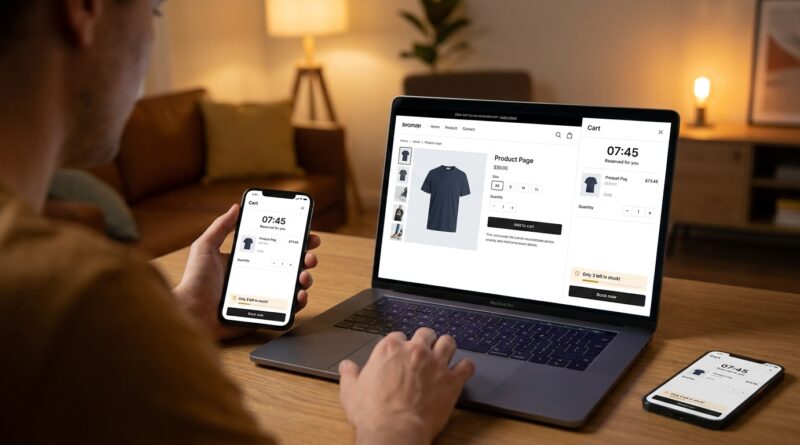
The ‘Cart-Hold Flash’ Strategy: Lock In Hot Shoppers For 8 Minutes And Watch Conversions Jump
You pay for the click. You finally get someone to add a product to cart. Then they drift off, open three more tabs, text a friend, or decide to “come back later.” Most never do. That is the part that drives store owners crazy, because the hard work is already done. Traditional flash sales can make it worse. They pile everyone onto the same item at the same time, stock gets messy, and then support tickets start flying when orders have to be canceled. A smarter fix is the ecommerce cart reservation flash sale strategy. The basic idea is simple. When a shopper adds a hot item to cart, the store holds that unit for a short window, often 8 minutes, and shows a clear countdown. That gives serious buyers time to finish checkout, cuts overselling, and adds just enough pressure to stop last-minute hesitation. For smaller Shopify and Woo stores, it can be one of the cleanest ways to turn intent into paid orders.
⚡ In a Hurry? Key Takeaways
- A Cart-Hold Flash reserves inventory for a shopper for about 8 minutes after add-to-cart, which can reduce drop-off and overselling during busy promos.
- Start with a short hold on limited-stock items, add a visible cart countdown, and release stock automatically when the timer ends.
- Used well, this can raise conversions without creating the customer service mess that comes from canceled orders and broken sale rules.
What a Cart-Hold Flash actually is
Think of it like putting a concert ticket in someone’s name for a few minutes.
The second a shopper adds a sale item to cart, your store marks that item as temporarily unavailable to everyone else. Not forever. Just long enough for that person to pay. In most setups, 5 to 10 minutes is the sweet spot. Eight minutes is a practical middle ground.
Why eight? It is long enough for someone to enter card details, apply a code, or switch from mobile wallet to desktop if needed. But it is short enough that inventory does not sit stranded in abandoned carts all afternoon.
What the shopper sees
A good setup is simple and obvious:
- “Your item is reserved for 8:00 minutes”
- A countdown timer in cart or checkout
- A plain message that stock returns to the store if time runs out
No tricks. No fake scarcity. Just clear rules.
Why this works better than a standard flash sale
Normal flash sales create urgency, yes. But they also create friction. Shoppers rush, inventory gets out of sync, and your team ends up sorting out who really got the last unit.
A cart hold changes the pressure point. Instead of making everyone panic on the product page, it gives urgency only to shoppers who have already raised their hand and said, “I want this.” That is a much better place to add a timer.
You are not trying to get more random visitors. You are trying to stop warm buyers from slipping away in the final stretch.
It also calms inventory chaos
This is a big deal for founder-led stores.
If you are running Shopify or WooCommerce without expensive enterprise inventory tools, your sale process has to be clean. Cart holds help because they:
- reduce double-selling on limited stock
- cut the odds of post-purchase cancellations
- make customer expectations clearer
- give your support inbox a break
When to use the ecommerce cart reservation flash sale strategy
This works best when demand is real and stock is tight.
Good fits
- limited-run product drops
- seasonal flash promos
- restocks of popular items
- bundles with low inventory
- ads driving high-intent traffic to one hero product
Less useful fits
- products with deep stock and low urgency
- stores with very long checkout flows
- promos where customers need lots of comparison time
If someone needs 45 minutes to research sizing, read reviews, and ask a partner, an 8-minute hold may feel pushy. This idea works best when the buyer is already close to ready.
How to set it up without annoying customers
The trick is to make the hold feel fair, not manipulative.
1. Reserve only after add-to-cart
Do not hold stock just because someone opened the product page. That is asking for trouble. The hold should start only when the shopper adds the item to cart.
2. Keep the timer visible
Hide the timer and people will feel ambushed when the item disappears. Show it clearly in cart and ideally again at checkout.
3. Explain the rule in plain English
Something like this works well:
“This item is reserved for you for 8 minutes. If checkout is not completed in time, it returns to available stock.”
4. Limit holds to scarce items
You do not need this for every SKU in the store. Start with products that sell out fast or are likely to create oversell headaches.
5. Release inventory automatically
This part matters. The hold should expire on its own. If your team has to manually free stock, the whole system falls apart during a busy sale.
That same “set the rules and let them end themselves” thinking is why articles like The ‘Auto‑Lock Flash Sale’ Strategy: Run 24‑Hour Deals That End Themselves (And Earn You More Trust) hit such a nerve with store owners. People are tired of sales that rely on someone remembering to flip switches by hand.
What can go wrong
This is not magic. A sloppy cart-hold setup can create new problems.
Holds that are too long
If you reserve stock for 20 or 30 minutes, popular items can look sold out even though nobody has paid yet. That frustrates real buyers and can hurt total revenue.
Confusing messaging
If shoppers do not understand why a product vanished or why a timer expired, they will assume your store is broken. Keep the wording clear.
Inventory rules that do not sync
This is the technical danger point. Your store, checkout, and any app handling the hold need to agree on stock in real time. Test before launch. Then test again under load if you can.
Bad mobile experience
Most flash-sale traffic lands on phones. If the countdown blocks buttons, lags, or disappears below the fold, you lose the benefit fast.
How to test it before a full launch
You do not need to rebuild your whole promo calendar.
Start small. Pick one fast-moving product. Run the hold for one weekend promo or one email blast. Then compare:
- cart-to-checkout rate
- checkout completion rate
- oversold units
- support tickets about stock issues
- recovered revenue from high-intent traffic
The main question is not “Did every metric go up?” It is “Did fewer ready-to-buy people slip through the cracks?”
Best practices for Shopify and Woo brands
Smaller brands do not need enterprise software to use this well. They do need discipline.
For Shopify stores
Look for apps or custom setups that can reserve stock at cart level, show a timer, and release inventory automatically. Check that the app handles flash-sale traffic and plays nicely with your theme and checkout setup.
For WooCommerce stores
Make sure your plugin updates stock quickly and does not conflict with caching, cart fragments, or your payment flow. Woo can be flexible, which is nice, but flexibility also means more chances for odd little conflicts.
For both
- test on mobile first
- use plain timer messaging
- avoid stacking too many pop-ups with the countdown
- train support so they can explain the hold policy clearly
Why the countdown matters more than people think
The countdown is not just decoration.
It answers a question shoppers may not say out loud: “Do I need to act now, or can I wander off?” If the answer is vague, many wander off. If the answer is visible and fair, more finish the purchase.
That is what makes this strategy so practical. The urgency happens at the point of strongest intent. Not at the top of the funnel. Not in a generic “sale ends soon” banner. Right when the shopper is deciding whether to complete the job.
At a Glance: Comparison
| Feature/Aspect | Details | Verdict |
|---|---|---|
| Urgency method | Cart hold adds a countdown after add-to-cart instead of forcing all urgency on the product page. | Better for converting shoppers who are already interested. |
| Inventory control | Temporarily reserves limited stock, then returns it automatically if checkout is not finished. | Strong option for reducing overselling and canceled orders. |
| Store complexity | Needs clear messaging, timer visibility, and reliable stock syncing across cart and checkout. | Worth testing, but only if the setup is stable. |
Conclusion
Inventory stress and overselling are some of the most common flash-sale headaches, especially for founder-led Shopify and Woo brands trying to run sharp promos without a giant tech stack. That is why a Cart-Hold Flash is so useful. It lets you run a short, aggressive offer without turning checkout into a support disaster. The timer does the urgency work quietly. The automatic release keeps stock moving. And most importantly, it helps stop already-interested shoppers from bailing in those final minutes. When ad costs are high and attention is all over the place, the biggest win is often not getting more traffic. It is getting more from the traffic you already paid for. An 8-minute cart hold is one of the simplest ways to do that well.