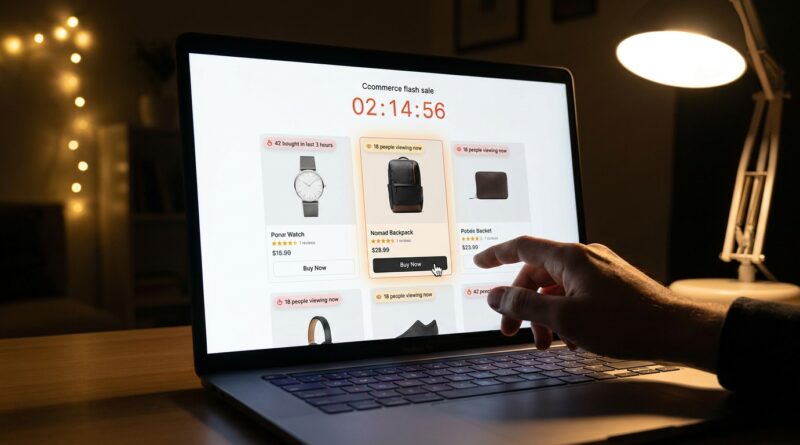
The ‘Real-Time Crowd Signal’ Flash Sale Strategy: Turn Live Shopper Activity Into Instant FOMO
Flash sales are frustrating when the numbers should work, but the page still feels dead. You cut the price, run the ads, send the emails, and watch people click in. Then they hesitate. They scroll, compare, get distracted, and leave. A lot of flash sale pages make this worse because they look frozen in time. The shopper cannot tell if the product is hot, nearly gone, or being ignored by everyone else. That silence kills momentum. A smart flash sale social proof strategy fixes that by showing real-time crowd signals such as recent purchases, active viewers, units claimed, or how fast stock is moving. Done well, this gives shoppers two things they need fast. Urgency and reassurance. It tells them, “People like me are buying this right now, and I may miss out if I wait.” That tiny shift can reduce hesitation in the first few seconds, which is often where the sale is won or lost.
⚡ In a Hurry? Key Takeaways
- Use live shopper activity on flash sale pages to turn a static discount into a more convincing, higher-converting offer.
- Start with simple signals like “27 bought in the last hour” or “14 people viewing now” near the add-to-cart button.
- Keep every message honest and easy to verify, because fake urgency can hurt trust faster than it lifts sales.
Why static flash sales underperform
Most brands treat a flash sale like a poster. Big discount. Countdown timer. Product photo. Maybe a stock badge. Then they hope the price does the heavy lifting.
But shoppers are more cautious than that, especially now. They have seen too many gimmicks. A timer by itself is not enough. In some cases, it even makes people suspicious.
What they want is proof. Not a lecture. Not a hard sell. Just a quick sign that this deal is real and other people are acting on it.
That is where a real-time crowd signal works. It gives the page motion. It tells the visitor that this is a live event, not a stale landing page left running on autopilot.
What a “Real-Time Crowd Signal” actually means
A real-time crowd signal is any live or near-live piece of social proof that shows shopper activity during the sale.
Common examples
You have probably seen versions of this already:
- “23 people are viewing this right now”
- “41 units sold in the last 2 hours”
- “Only 8 left at this price”
- “Someone in Austin just bought this bundle”
- “Trending. This item is selling 3x faster than usual”
These signals work best when they answer the shopper’s silent question, which is usually some version of, “Is this worth buying right now, or should I wait?”
The signal says, “Others are not waiting.” That matters.
Why this flash sale social proof strategy works
People do not buy on price alone. They buy when they feel confident enough to stop searching.
A strong flash sale social proof strategy helps with that in three ways.
1. It reduces uncertainty fast
If other shoppers are buying now, the product feels less risky. This is especially helpful for first-time visitors who do not know your brand yet.
2. It adds urgency without shouting
A countdown timer says time is running out. A crowd signal shows that demand is moving too. That combination feels more believable.
3. It makes the sale feel alive
Live activity creates energy. Even a basic product page feels more like an event when shoppers can see movement.
This is one reason some brands get better results without offering the deepest discount. They make the decision feel safer and more immediate.
Where to place live proof so people actually notice it
Placement matters more than most teams think. If the signal is buried halfway down the page, it loses a lot of its value.
Best spots to test first
- Right under the product title
- Near the price and sale badge
- Directly above the add-to-cart button
- Inside the cart drawer or checkout step
The goal is simple. Show the proof at the exact moment hesitation starts.
If you already use SMS to drive traffic, pairing live on-page proof with follow-up messaging can be even stronger. That is why strategies like The ‘Text-Back Flash Sale’ Strategy: Turn One SMS Into A 24-Hour Revenue Loop fit nicely here. One gets people back in. The other helps them feel comfortable buying once they arrive.
What to show first if you want a quick win
You do not need a fancy system on day one. Start with the signals that are easiest to understand and hardest to misread.
Good starter signals
Recent purchases: “18 bought in the last hour” is clear, simple, and sales-focused.
Current viewers: This can work well during short sale windows, especially on popular items.
Inventory movement: “Only 11 left” or “Stock is moving fast” can push action if the data is real.
Time-sensitive bundle uptake: If a bundle is part of the flash sale, showing how many have been claimed adds credibility.
Pick one or two. Too many signals at once can make the page look noisy or manipulative.
What to avoid if you want trust, not eye rolls
Shoppers are not naive. If your page says “Hurry, 3 left” every time they visit for three days straight, they will notice.
Watch out for these mistakes
- Using fake stock levels
- Showing impossible purchase counts
- Firing popups every few seconds
- Letting mobile screens get cluttered
- Using vague language that sounds made up
The best social proof feels natural. It supports the sale. It does not hijack it.
If your numbers are estimates, be careful with wording. “Popular right now” is safer than pretending you have exact live counts when you do not.
How to build this without rebuilding your whole store
This is the good news. You do not need a giant development project.
Most stores can start with tools they already have, or with a lightweight app that pulls from order data, stock levels, or page activity. Even a basic setup can make a noticeable difference if the timing and wording are right.
A simple rollout plan
- Choose one flash sale product or collection
- Add one real purchase signal and one scarcity signal
- Place them near price and add-to-cart
- Check mobile layout first
- Measure conversion rate, add-to-cart rate, and bounce rate
Keep the test clean. Do not change five other things at the same time or you will not know what actually helped.
How to know if it is working
Do not just look at total revenue. That number can be influenced by traffic swings, ad spend, and product mix.
Better metrics to watch
- Product page conversion rate
- Add-to-cart rate
- Time to purchase
- Bounce rate on sale landing pages
- Cart abandonment during the flash sale window
If the strategy is doing its job, you should see shoppers decide faster. That is the whole point. Less hesitation. More action.
At a Glance: Comparison
| Feature/Aspect | Details | Verdict |
|---|---|---|
| Static timer only | Creates urgency, but offers little proof that shoppers actually care about the deal. | Useful, but weak on its own |
| Live purchase or viewer signal | Shows that other people are engaging right now, which reduces hesitation and adds confidence. | High impact, easy first test |
| Fake or exaggerated urgency | May create a short-term lift, but can damage trust and hurt repeat buying if shoppers spot the trick. | Avoid completely |
Conclusion
The brands quietly winning flash sales right now are not always the ones with the loudest discount. They are the ones making the decision easier in the first three seconds. A good flash sale social proof strategy adds live proof that other humans are buying, watching, and moving fast. That matters because it pairs urgency with confidence, which is exactly what price-conscious shoppers need before they click buy. With ad costs climbing and personalized offers getting more common, this is one of the few changes that can lift conversions without tearing up your whole setup. Start small, keep it honest, and make the page feel alive. If you do that, you can turn the traffic you already have into more revenue before the timer runs out.